


Reviewing and accepting your financial aid is one of the most important steps after you’ve been admitted.
Before you begin, you must set up your Concordia Texas student email.
Set Up Your Student Email
Some scholarships and grants are offered on a first-come, first-served basis, so it’s important to complete this step as soon as possible.
Need Help?
If you have questions about your financial aid or need help completing this step, your admissions counselor is here to help.
Contact AdmissionsStart Here: Review & Accept Your Financial Aid
Follow these steps in MyInfo to review and accept your financial aid package.
Step 1: Log Into MyInfo

- Go to https://myinfo.concordia.edu/
- Log in using your Concordia Texas credentials
- Select the Student tile
- Click Financial Aid
Step 2: Select Your Aid Year
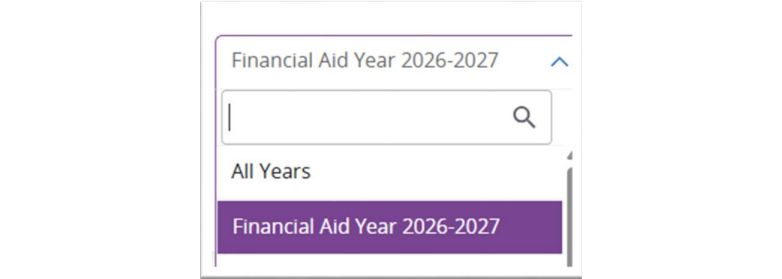
- Choose the correct aid year from the dropdown
- Example: 2026–2027 Aid Year
Step 3: Review Your Offer

- Click on the Offer tab
Step 4: Accept Your Aid
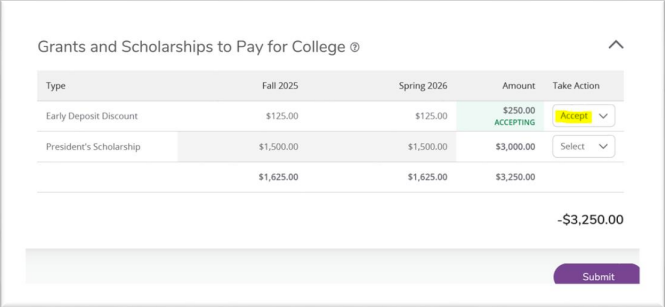
- Select Accept Full Amount All Awards to accept everything offered
- Or use the dropdown to accept or decline individual awards
- Click Submit to finalize your decision
- If you want a lower amount, accept the award first, add a comment with the amount you want, and click Submit
Step 5: Report Additional Resources (If Needed)

- If you have outside funding (scholarships, employer support, etc.)
- Click Add/View Resource - Enter details (description, amount, term) - Submit
Step 6: Accept Terms and Conditions
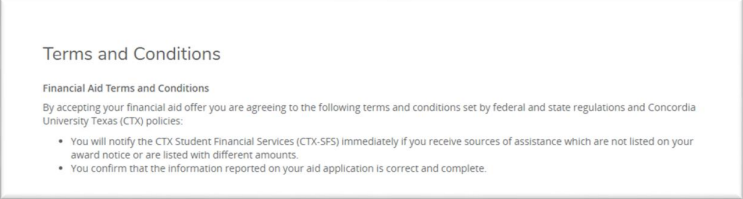
- Review the Terms and Conditions popup
- Click Accept
Step 7: Confirm Completion
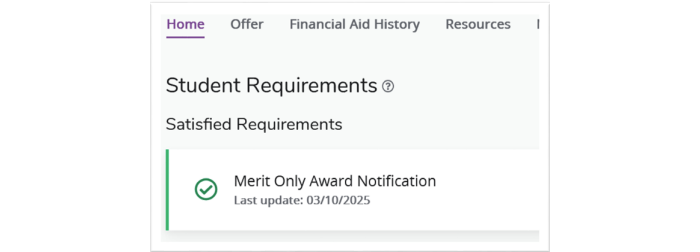
- Return to the Home tab Confirm your status shows
- Received/Satisfied Log out when finished
Don’t Miss This Step
Your financial aid is not complete until you:
- Accept your awards
- Accept Terms and Conditions
- Confirm your status shows Received/Satisfied
Frequently Asked Questions
-
Do I have to accept all of my financial aid?
No. You can accept all, some, or none of your offered aid.
-
What if I want to reduce a loan or award?
Accept the award first, then submit a comment requesting a reduced amount.
-
What happens after I accept my aid?
Your financial aid will be processed and applied toward your student account.
-
What if I have scholarships or funding not listed?
Use the Add/View Resource option to report outside funding.
-
Who do I contact if I need help?
Contact your admissions counselor for support with reviewing and accepting your financial aid.